1 min read
GPO Settings Still Set After Removal?
I ran into something quite odd the other day.
1 min read
Robbz Olson
:
Updated on August 17, 2026
If you've supported QuickBooks long enough you've probably heard this one:
"Just add Everyone... it'll fix it."
Unfortunately during security audits, I still run into environments carrying around old permissions and user rights that nobody fully understands anymore. One setting that's worth reviewing is:
Deny access to this computer from the network
"SeDenyNetworkLogonRight"
To review or modify it:
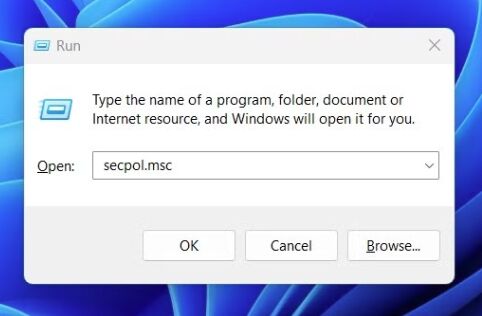
Open Local Security Policy (secpol.msc)
Navigate to:
- Security Settings → Local Policies → User Rights Assignment
Open:
Deny access to this computer from the network
During security audits, I regularly find environments where Everyone is still sitting in permissions years after the original problem was "fixed."
After digging through old documentation and talking with the team, the story is usually the same...
An old QuickBooks installation (or another legacy application) needed a workaround.
Someone made the change, the issue was resolved & the application was upgraded. But the permission never got cleaned up. It simply became part of the environment. Years later, nobody remembers why it's there and nobody wants to remove it. Because if QuickBooks is still working, nobody wants to be the person who breaks payroll on a Tuesday afternoon.
And honestly...
That's how a lot of security debt happens. Not because someone made a bad decision. Because someone made a temporary decision.
What this policy does: It explicitly prevents the users or groups listed from accessing the computer over the network.
According to the CIS Benchmarks, this policy should typically only contain:
- Local account
- Guests
If you're seeing Everyone, Authenticated Users, or other broad groups here, it's worth taking the time to understand why before simply accepting it as "the way it's always been."
Just because something made an application work years ago...
...doesn't mean it's still the right configuration today.
Most of those "fixes" were actually covering up the real problem:
- NTFS permissions
- SMB configuration
- Windows Firewall
- QuickBooks Database Server Manager
- Share permissions
Not the User Rights Assignment itself. Hardening isn't just about adding new security controls. Sometimes it's about cleaning up the ghosts of troubleshooting past.
1 min read
I ran into something quite odd the other day.
1 min read
Maybe I am old now but I feel more and more everyday like Windows is becoming like a news feed. Nothing says "Enterprise-Grade Workstation" like...
1 min read
One thing I still see constantly in business environments?People treating PIN logins like they’re “just a shorter password.”They’re not.And if you...